Where to see your Claude usage.
Open Claude Settings → Usage while signed in to the account you use for Claude Code. Check the account and organization first, especially if you switch between work and personal access.
Read each limit beside its own reset time. Keep this official view available when comparing a reading on your phone or watch.
In Claude Code, enter /usage to inspect the available account usage view. If that command is unavailable in your installed version, use Settings → Usage on the web. Context describes how much the current conversation can hold; check it separately from account usage.
Check the window before the countdown.
For subscription access, Claude on the web, desktop and Claude Code shares the account’s applicable limits. The usual session window starts with your first message and resets five hours later; weekly resets follow the account’s assigned schedule. Check the plan-specific cases in the table below.
A session with remaining allowance can coexist with an exhausted weekly limit. Read the account, group and period together; one bar cannot establish that every applicable limit is available.
Conversation context capacity and account allowance answer different questions. TokenVive’s Claude connection shows supported usage windows; it does not report live conversation context, message counts or token analytics.
Read the windows your plan actually shows.
| Account case | What to read |
|---|---|
| Plans with a session window | Read its usual five-hour reset from the first message, alongside any weekly allowance. Do not infer a fixed message or token count. |
| Ultra | Verified accounts have no five-hour session cap; weekly limits still apply. Pending verification can retain a temporary session cap. |
| Special model or group | If the account displays an additional window, read that window’s scope and reset too. A general remaining bar cannot override an exhausted applicable group. |
For Pro and other plans, task length, model and tools affect consumption. Compare the official windows instead of treating a plan as a guaranteed number of prompts.
A reset offer has its own conditions.
Claude sometimes offers eligible accounts a manual reset in Settings → Usage. This is separate from the normal countdown and does not move the regular weekly reset. Check the offer’s scope and expiry in Claude’s limit-reset instructions.
If an offer is available, open Settings → Usage in Claude on the web, Claude Desktop or Claude Mobile. Review “Reset for free” in the Limit resets section and confirm only after checking its scope and expiry. The button is currently unavailable in the Claude Code terminal or IDE. Restored usage is shared across the account, including Claude Code.
Refreshing TokenVive fetches the available reading. It cannot redeem a Claude offer, add allowance or change a provider’s reset schedule.
Check the offer date and restoration scope
The Fable 5.2 launch offer, read November 15, has different conditions for Pro / standard Team seats and qualifying Max / Ultra accounts. The former’s launch benefits expire November 16, 2026 at 23:59 Pacific Time; qualifying longer-lived resets can expire March 8, 2027 at 23:59 Pacific Time. Your plan, seat and subscription timing determine eligibility. Restoring Fable weekly consumption and refilling an applicable five-hour window are separate effects; the offer does not raise the normal upper limit.
Treat these as dated offer terms. Open the official offer for current eligibility and expiry before acting. An expired offer is not a new source of allowance.
Find the correct allowance or credit balance.
| Type | Where and how to check |
|---|---|
| Included allowance | Read session, weekly and model windows in Settings → Usage. |
| Extra usage credits / bundles | Review the official credit balance, purchase terms and spending controls. Extra use has its own cost; buying a bundle does not enlarge the included plan allowance. |
| API credits | Use the API account’s billing view. API credits and a Claude subscription’s extra-use balance are separate. |
Spending limits and auto-reload affect paid extra use where available. Review them in Claude before enabling them. TokenVive does not buy bundles, change spending settings or provide a complete credit ledger.
Connect on iPhone, then check on your wrist.
- Choose Claude Code in TokenVive Settings. Open the official authorization page and review the permissions for the intended account.
- Return with the authorization code. Paste the complete code into TokenVive’s authorization-code field, then tap the button to finish connecting.
- Select the account and usage window. In the energy view, use the arrow beside the account to inspect its available usage windows. Read the remaining percentage, reset time and last update together.
- Open TokenVive on both paired devices. The iPhone syncs the credentials used by Apple Watch for supported usage checks. Reconnect expired sessions on iPhone.
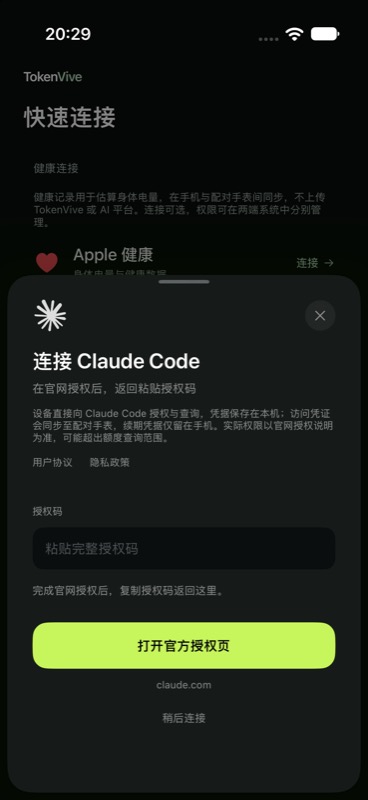
TokenVive requires iOS 17 or later; the watch app requires watchOS 10 or later. AI connections and refreshes require active TokenVive membership or remaining trial access. See supported AI services and data.
If a reading is missing or looks different.
- Used or remaining: compare the labels. TokenVive’s ring shows remaining allowance, so it can be the complement of a percentage used.
- Account and window: compare the same organization, model group and period in Claude’s official view.
- Update time: a failed refresh keeps the last successful result and its timestamp. Reconnect on iPhone if requested.
- Missing fields: an unavailable window is not a measured zero. Plan changes can expose data that the app does not yet support.
Watch and widget updates may arrive later than a foreground refresh. If a discrepancy remains, use the official account view for the current limit and follow connection and sync help.
Why is the percentage rising faster?
First check whether the label means used or remaining. Then match the model group, task size, tools and active conversations. Usage can differ for tasks with the same message count. Compare reset times in the same time zone; refreshing the app does not start a new provider cycle. If a window is absent, confirm plan and verification status before treating it as a connection failure.
Official sources
Provider guidance checked on . Your account’s current rules take precedence over older screenshots.
- Claude usage and length limits
- Claude limit-reset offers
- Claude Ultra and account verification
- Claude usage credits
TokenVive is an independent app. Claude and Claude Code identify the services discussed here.
Credit and usage guidance was read November 12; the launch offer was read November 15, 2026. The content revision date is separate from those checks.
Before publication, the reset button locations and Fable offer deadlines were rechecked in the official help pages on November 16, 2026.